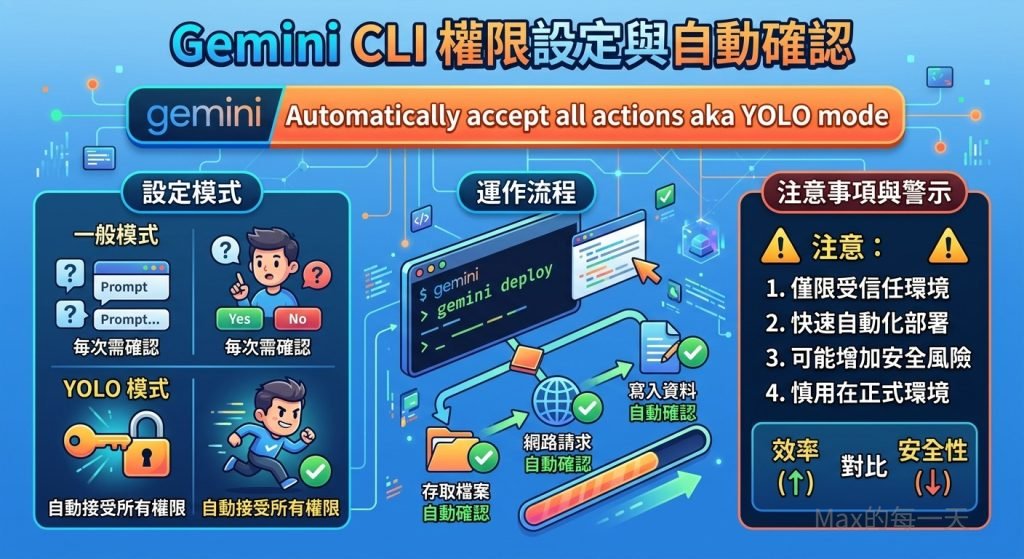
最近我變成了 Gemini CLI 的重度使用者,這工具真的太方便了。
Gemini CLI 真的超方便,幾乎不用去記什麼指令就可以完成複雜的工作,而且還可以問問題,也可以直接叫他做事情,而且也可以寫程式,雖然沒辦法反應速度還有處理內容的品質跟專業的 Claude Code 比,聊勝於無,窮人的救星。
但在使用過程中,即使切換到自動模式,系統還是會一直跳出確認視窗問「你確定嗎?」,這對想要流暢操作的人來說,真的有點掃興。
為什麼會一直跳出確認提示
其實這不是系統出錯,而是為了安全考慮。Gemini CLI 預設會對一些比較有「風險」的操作,像是幫你下指令、改檔案、刪除東西等動作進行攔截,怕 AI 一不小心就把你的電腦弄亂。如果你發現它一直問個不停,通常是因為目前的權限設定只有針對單次操作,或者它還不知道你已經完全授權給它了。
開啟 YOLO 模式直接自動執行
如果你跟我一樣,希望它直接把事情做完,不要再跳視窗問我,最簡單的方法就是在啟動時加入參數。在 Gemini CLI 裡有一個很直覺的設定叫做 YOLO 模式(意思就是「人生只有一次,直接衝吧!」),只要加上 –yolo 或設定相關參數,它就會變得很乖。
常用的指令用法如下:
gemini "幫我建立一個資料夾" --yolo或者是使用更細緻的權限設定:
--approval-mode yolo這樣一來,所有的工具操作都會自動通過,讓你在寫程式或處理雜物時,能感受到那種不被打斷的絲滑快感。
兩個功能一模一樣的指令
你可能在教學文件看過 –yolo,也看過 –approval-mode yolo。別被搞混了,它們在功能上完全一樣。
這兩個指令的作用,就是開啟「自動核准」。不管是建立資料夾、刪除過期檔案,還是直接執行 Shell 指令,它都會跳過詢問視窗,直接幫你做到底。
為什麼要分兩種寫法?
這其實是工具進化的過程。
–yolo 就像是快捷鍵,適合老用戶或追求效率的人,加一個標籤就搞定。
–approval-mode yolo 則是為了更細緻的控制。就像開車有「手排」、「自排」跟「運動模式」一樣,官方把「核准機制」獨立成一個選項,方便未來可以有更多變化。例如,有些模式可能只允許自動改檔案,但不准它亂跑指令。
我該選擇哪一種?
如果你只是平常在終端機(Terminal)隨手打指令,用 –yolo 或是短縮寫 -y 最快,省時又省力。
方便之餘也要注意安全
最後要提醒大家,YOLO(You Only Live Once)模式雖然爽快,但也很危險。
權限全開就像是把家裡鑰匙直接交給 AI。因為它現在會自動接受所有動作,萬一 AI 判斷錯誤,有可能會不小心誤刪你的重要檔案,或者執行到具備破壞性的指令。
強烈建議大家在「個人開發環境」或「測試用沙盒」裡使用就好,千萬不要直接在公司的正式生產環境(Production)這樣玩,安全還是第一優先喔!
大家在使用這類 AI 終端機工具時,還有遇到什麼讓你覺得很卡手的地方嗎?歡迎在下面分享你的祕技!
#GeminiCLI #AI工具 #自動化 #開發者日常 #YOLOmode
Yolo 模式與自動確認
要從一開始就賦予Gemini CLI 權限並避免跳出提示,最直接的做法是透過啟動參數來設定。gemimi 指令用法:
Gemini CLI - Defaults to interactive mode. Use -p/--prompt for non-interactive (headless) mode.

Commands:
  gemini [query..]             Launch Gemini CLI                                                               [default]
  gemini mcp                   Manage MCP servers
  gemini extensions <command>  Manage Gemini CLI extensions.                                        [aliases: extension]
  gemini skills <command>      Manage agent skills.                                                     [aliases: skill]
  gemini hooks <command>       Manage Gemini CLI hooks.                                                  [aliases: hook]

Positionals:
  query  Initial prompt. Runs in interactive mode by default; use -p/--prompt for non-interactive.

Options:
  -d, --debug                     Run in debug mode (open debug console with F12)             [boolean] [default: false]
  -m, --model                     Model                                                                         [string]
  -p, --prompt                    Run in non-interactive (headless) mode with the given prompt. Appended to input on
                                  stdin (if any).                                                               [string]
  -i, --prompt-interactive        Execute the provided prompt and continue in interactive mode                  [string]
  -s, --sandbox                   Run in sandbox?                                                              [boolean]
  -y, --yolo                      Automatically accept all actions (aka YOLO mode, see
                                  https://www.youtube.com/watch?v=xvFZjo5PgG0 for more details)?
                                                                                              [boolean] [default: false]
      --approval-mode             Set the approval mode: default (prompt for approval), auto_edit (auto-approve edit
                                  tools), yolo (auto-approve all tools), plan (read-only mode)
                                                              [string] [choices: "default", "auto_edit", "yolo", "plan"]
      --policy                    Additional policy files or directories to load (comma-separated or multiple --policy)
                                                                                                                 [array]
      --admin-policy              Additional admin policy files or directories to load (comma-separated or multiple
                                  --admin-policy)                                                                [array]
      --acp                       Starts the agent in ACP mode                                                 [boolean]
      --experimental-acp          Starts the agent in ACP mode (deprecated, use --acp instead)                 [boolean]
      --allowed-mcp-server-names  Allowed MCP server names                                                       [array]
      --allowed-tools             [DEPRECATED: Use Policy Engine instead See
                                  https://geminicli.com/docs/core/policy-engine] Tools that are allowed to run without
                                  confirmation                                                                   [array]
  -e, --extensions                A list of extensions to use. If not provided, all extensions are used.         [array]
  -l, --list-extensions           List all available extensions and exit.                                      [boolean]
  -r, --resume                    Resume a previous session. Use "latest" for most recent or index number (e.g. --resume
                                  5)                                                                            [string]
      --list-sessions             List available sessions for the current project and exit.                    [boolean]
      --delete-session            Delete a session by index number (use --list-sessions to see available sessions).
                                                                                                                [string]
      --include-directories       Additional directories to include in the workspace (comma-separated or multiple
                                  --include-directories)                                                         [array]
      --screen-reader             Enable screen reader mode for accessibility.                                 [boolean]
  -o, --output-format             The format of the CLI output.        [string] [choices: "text", "json", "stream-json"]
      --raw-output                Disable sanitization of model output (e.g. allow ANSI escape sequences). WARNING: This
                                  can be a security risk if the model output is untrusted.                     [boolean]
      --accept-raw-output-risk    Suppress the security warning when using --raw-output.                       [boolean]
  -v, --version                   Show version number                                                          [boolean]
  -h, --help                      Show help                                                                    [boolean]